


Image to Text Converter
Prepostseo’s Image to Text Converter is a free online tool that lets you convert images, scanned documents, and handwritten notes into editable text. It features advanced OCR technology to accurately copy text even from low-resolution photos. It can extract text from any image format, including JPG, PNG, JPEG, GIF, JFIF, PDF, HEIC, WEBP, and others.
How to Convert Image to Text?
Just follow these simple steps to copy text from images using the Prepostseo JPG to Text converter:
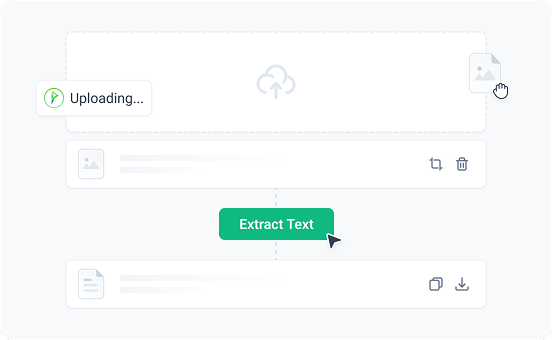
- Upload, paste, or drag & drop the image into the input box.
- Optionally, paste an image URL.
- Click the Extract Text button to start the OCR conversion.
- Our picture to text converter will instantly turn your images into editable text.
- Copy the extracted text or download it as a .txt file.
Key Features of Our Image to Text Converter
Below are the advanced features of our tool that make it the standout option for converting images into text.

Accurate Image Text Extractor
Our tool ensures 98% accuracy! Powered by modern OCR, our image text extractor detects and extracts text from images, including blurry or low-resolution photos, screenshots, and scanned documents.

Extract Mathematical Terms
This photo to text converter is not just limited to plain text; it can also extract complex math expressions. If your images contain algebraic formulas, geometric equations, or arithmetic calculations, our tool will identify and convert them like a professional.

Freemium
Our pic to text converter is available for free, without any sign-up. For higher usage limits and additional features, you can upgrade to a premium plan.

100% Data Security
Your safety and privacy are our top priorities. All of your data is processed securely and never shared with third parties or stored in our database.

20+ Languages Supported
This online OCR tool provides multilingual support. It can convert images into text in English, Spanish, German, Russian, Portuguese, Czech, Swedish, Polish, Dutch, French, Indonesian, Romanian, Thai, Italian, Irish, Danish, Korean, Filipino, Turkish, Arabic, Vietnamese, and Japanese.

Extract Text from Image URL
Apart from uploading images, you can also convert a picture to text by inserting a link into the URL box. This feature is especially useful when browsing the internet and coming across images that contain text.

Batch Conversion
Our tool can convert multiple images to text in one go. You can upload up to 50 images, extract text from all at once, and download the results together. This feature is helpful for anyone processing large volumes of documents, notes, or screenshots.

Works on All Devices
You can access this online JPEG to text converter from any device, including mobile phones, tablets, and desktops, through a web browser. Plus, Prepostseo’s dedicated image to text app is also available.

Tools Integration
Our image to text converter is integrated with multiple other useful tools, including Text to Word, Text to PDF, Image Translator, PDF to Word, and others. Using these tools can streamline your different types of tasks and enhance productivity.
Benefits of Prepostseo Image to Text
Here are the key benefits of this picture to text tool:
It quickly extracts text from images, scanned documents, and handwritten notes, saving users time and effort.
Its OCR engine helps you avoid the mistakes that often occur during manual data entry.
After converting your image into editable text, it allows you to modify, search, copy, share, or translate it.
It streamlines tedious image to text extraction, helping you focus on more important work.
| 💡 Formats | JPG, PNG, JPEG, GIF, and more |
| 🎯 Result | Accurate, editable text |
| 💲 Price | Freemium |
| 🌐 Languages | 20+ Languages supported |
| ✔️ Save | Time and Money |
| 🥰 Improves | Work Efficiency and Productivity |
Top Uses of Picture to Text Converter
Explore the common uses of our JPG to text converter in daily life:
Digitize Study Materials
Students and teachers can use this picture to text converter to convert scanned images, handwritten notes, textbook pages, assignments, and lecture slides into editable text. This makes it easier to modify, organize, and share study material.
Boost Business Productivity
Business professionals can use this tool to automatically extract text from invoices, reports, forms, and other business documents. It reduces the time spent on the manual data entry process.
Extract Content from Social Media
You may encounter interesting images on Facebook, Instagram, X, and other social media platforms that contain useful text. With this OCR tool, you can extract text from these images and use it anywhere.
Edit & Reuse Data
After the text is extracted from images, it becomes fully editable. So, you can easily change, rewrite, format, or translate it and reuse it across different types of documents.
Supports 20+ Languages
 English
 Spanish
 Deutsche
 Русский
 Português
 Čeština
 Svenska
 Polskie
 Nederlands
 Français
 Indonesian
 Română
 ไทย
ไทย
 Italiano
 Gaeilge
 Dansk
Dansk
 한국어
한국어
 Filipino
 Türk
Türk
 Arabic
 Tiếng Việt
 日本人
日本人
 中文
中文
Frequently Asked Questions (FAQs)
How do I extract text from JPEG?

How do I convert handwritten notes to text?
How do I copy text from image online?